PRODUCTION ORDER LOADING PROCESS
For the components of the Production Orders (OP), we can manage the supply order by order, creating respective pickings, or through a centralized management of product needs. Excludes "Non-Inventory" items.
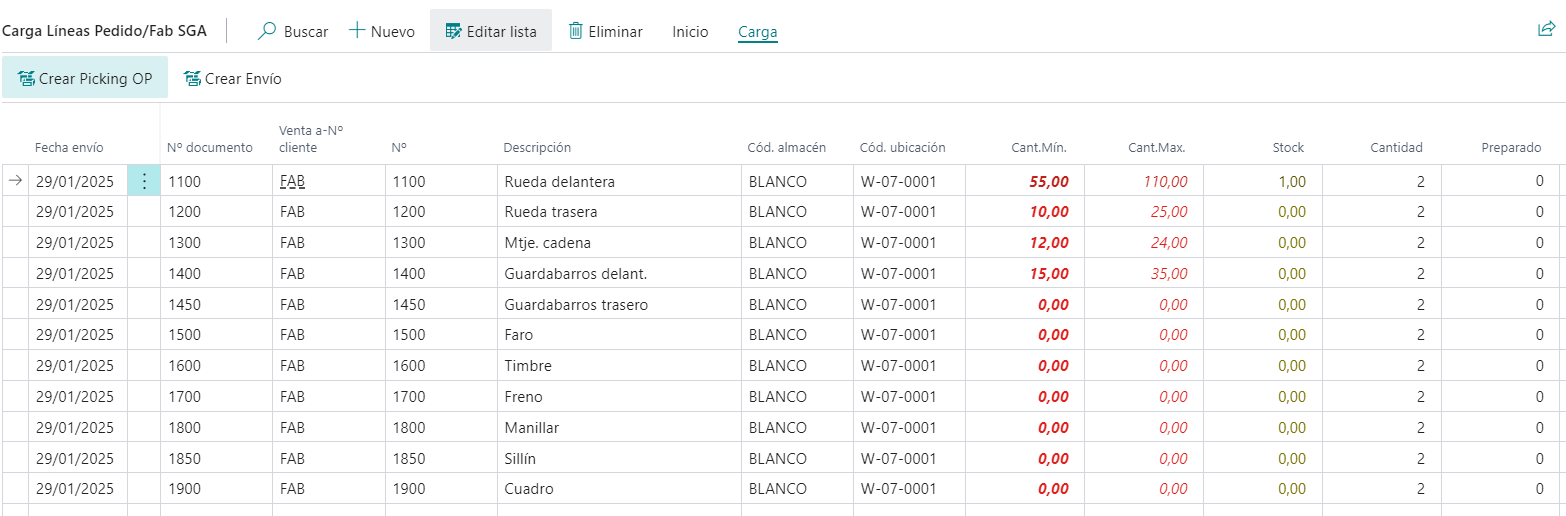
In the image, we see grouped needs and can manage the minimum quantity for which the Picking will be generated (when there is less stock than that quantity) and the maximum quantity desired.
For example, in the first line, we have:
Min: 55, Max: 110, and currently there is 1 unit in stock with a requirement of 2 units. Therefore, it will request 110 - 1 = 109 because there are less than 55 units available.
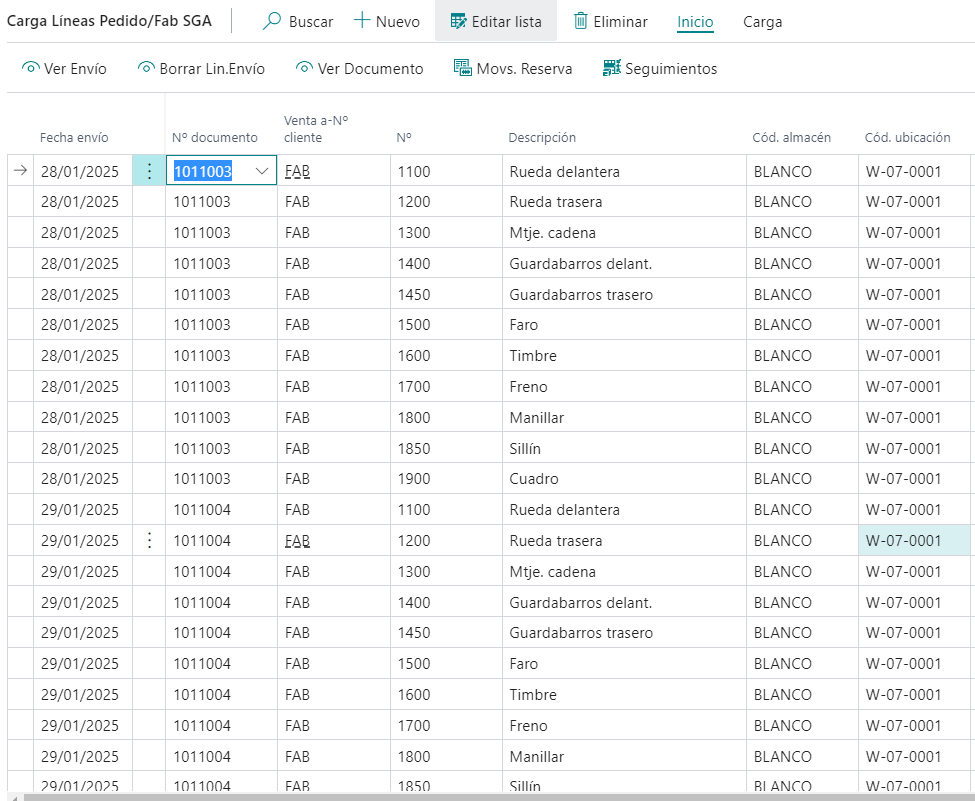
Calculating the load with a breakdown of Production Orders, we can see the details:
If we create the Production Picking to supply the Production Orders.
Events
/// <summary>
/// This is at the beginning of the function that links the warehouse activity lines with the current production component record.
/// It occurs before applying filters to the activity lines.
/// It can be used to add a filter or, by using IsHandled, apply custom filters.
/// </summary>
/// <param name="SalesLine">Temporary record containing information about the production order component.</param>
/// <param name="WAL">Will contain the related warehouse activity lines.</param>
/// <param name="IsHandled">To override the standard code with custom logic.</param>
[IntegrationEvent(false, false)]
local procedure OnBeforeFilterWAL_PO_awa(SalesLine: Record "Sales Line"; var WAL: Record "Warehouse Activity Line"; var IsHandled: Boolean)
begin
end;

/// <summary>
/// This is at the end of the function that links the warehouse activity lines with the current production component record.
/// It occurs after applying filters to the activity lines.
/// It can be used to add an additional filter.
/// </summary>
/// <param name="SalesLine">Temporary record containing information about the production order component.</param>
/// <param name="WAL">Related warehouse activity lines.</param>
[IntegrationEvent(false, false)]
local procedure OnAfterFilterWAL_PO_awa(SalesLine: Record "Sales Line"; var WAL: Record "Warehouse Activity Line")
begin
end;

/// <summary>
/// This is at the beginning of the function that calculates BinContent values, which are displayed as fields on the page: Min. Qty, Max. Qty, and Stock.
/// It can be used to change the calculation of these variables.
/// </summary>
/// <param name="Rec">Current record related to the components.</param>
/// <param name="gblQtyMin">Minimum Quantity.</param>
/// <param name="gblQtyMax">Maximum Quantity.</param>
/// <param name="gblStock">Stock.</param>
/// <param name="IsHandled">To override the standard code with custom logic.</param>
[IntegrationEvent(false, false)]
local procedure OnBeforeGetQtyBinContent_awa(Rec: Record "Sales Line" temporary; var gblQtyMin: Decimal; var gblQtyMax: Decimal; var gblStock: Decimal; var IsHandled: Boolean)
begin
end;

/// <summary>
/// This is at the end of the function that calculates BinContent values, which are displayed as fields on the page: Min. Qty, Max. Qty, and Stock.
/// It can be used to modify the calculation of these variables after they have been computed.
/// </summary>
/// <param name="Rec">Current record related to the components.</param>
/// <param name="gblQtyMin">Minimum Quantity.</param>
/// <param name="gblQtyMax">Maximum Quantity.</param>
/// <param name="gblStock">Stock.</param>
[IntegrationEvent(false, false)]
local procedure OnAfterGetQtyBinContent_awa(Rec: Record "Sales Line" temporary; var gblQtyMin: Decimal; var gblQtyMax: Decimal; var gblStock: Decimal)
begin
end;