Vendor Rebate Import Journal
Description
For organizations that receive rebates from external systems (vendor ERPs, B2B portals, offline calculations, etc.), the import journal allows these rebates to be brought into Business Central.
Once imported, rebate entries can be managed, settled, and analyzed within iDynamics Rebates in the same way as any other rebate generated automatically through rates or targets.
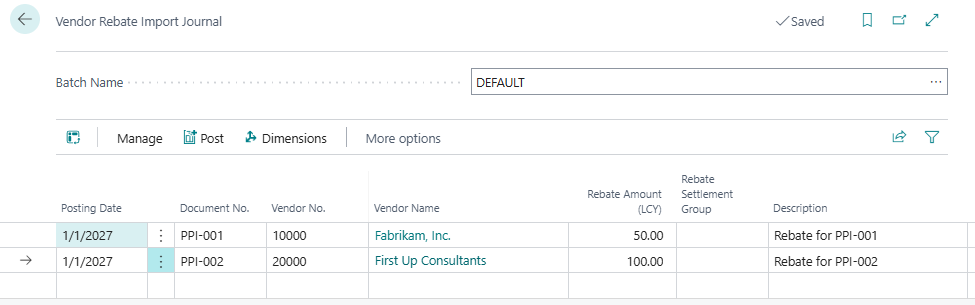
Entering Data in the Journal
Data can be entered:
- Manually, line by line.
- Using Edit in Excel.
- Through RapidStart for bulk loading.
- Via external integrations that write directly to the journal table.
By default, the following fields are visible in the journal:
- Posting Date – Specifies the accounting date on which the rebate entry will be created.
- Document No. – A reference identifying the document or process from which the rebate originates. The same number may appear for different vendors, but only once per vendor.
- Vendor No. – Identifies the vendor providing the rebate.
- Rebate Amount (LCY) – The rebate amount expressed in the local currency.
- Description – A brief explanation of the rebate’s purpose or the origin of the imported data. If left blank, a general description will be requested during posting for all lines without a description.
- Settlement Group Code – The settlement group that will be assigned to the resulting rebate entry.
The following optional values may also be provided, which are later used in reporting and analysis:
- Base Amount – The base amount on which the rebate was calculated in the external system.
- Purchase Amount (LCY) – The purchase amount that originated the rebate.
- Dimensions – Dimension codes used for financial analysis and segmentation.
Posting the Journal
Once all lines have been entered, the Post action creates one rebate entry per line, along with its corresponding detailed entry.
The journal is automatically cleared after posting, allowing a new import batch to be processed as needed.
The resulting rebate entries can be reviewed, settled, and included in reports in the same way as any other rebate entry managed through iDynamics Rebates.