Adjustment Journal
Description
The Rebate Adjustment Journal is designed to help you review and update rebate amounts in bulk. It provides a simple process to retrieve existing rebate entries, adjust their values, and post the changes efficiently.
Get Rebates
The first step to do, in order to use the adjustment journal, is to Get Rebates... to adjust, using the action available in the Home menu. This will bring to the journal every rebate entry that matches the specified filters.
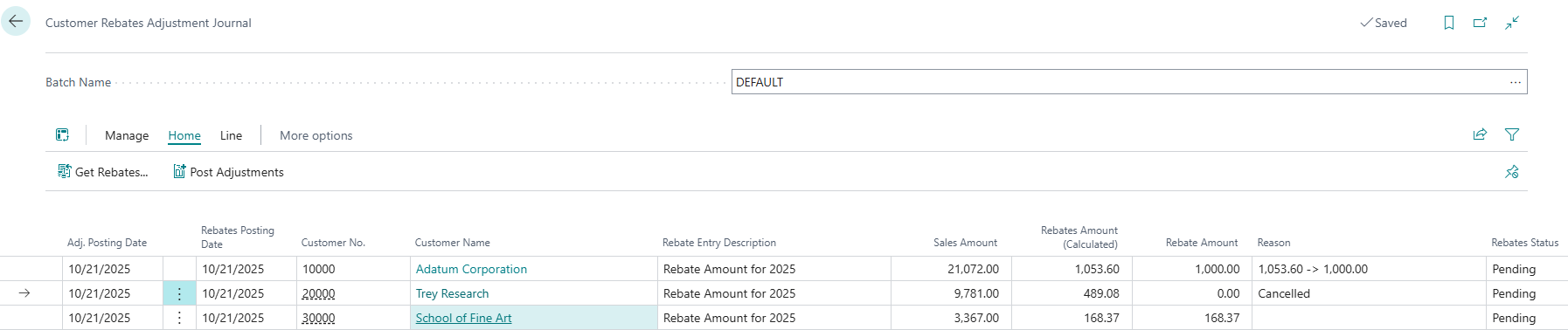
Review the Rebate Amounts
Once rebate entries have been added to the journal, you can quickly edit the Rebate Amount field, in any of them, to change the final rebate that will be given to the customer.
Note that a Reason must be entered if the amount is changed. If you don't want to enter a reason text for each line, the Post Adjustments action will ask for a Reason text that will be automatically applied to all lines that have modified amounts, and no reason specified.
Post the Journal
When all of the rebate amounts have been reviewed, use the Post Adjustments action to confirm the new amounts. Detailed rebate entries with the adjustments will be created in those cases that are needed, and the journal lines will be deleted so that you can start again.