Rate Performance Analysis
The Rate Performance Analysis page allows you to compare the performance of a rebate rate across two periods and evaluate its real impact on sales.
- Base period: reference period.
- Comparison period: period evaluated against the base period.
The comparison uses direct rebate entries to calculate sales, quantities, rebate amounts, campaign costs, net sales, and return on investment (ROI).
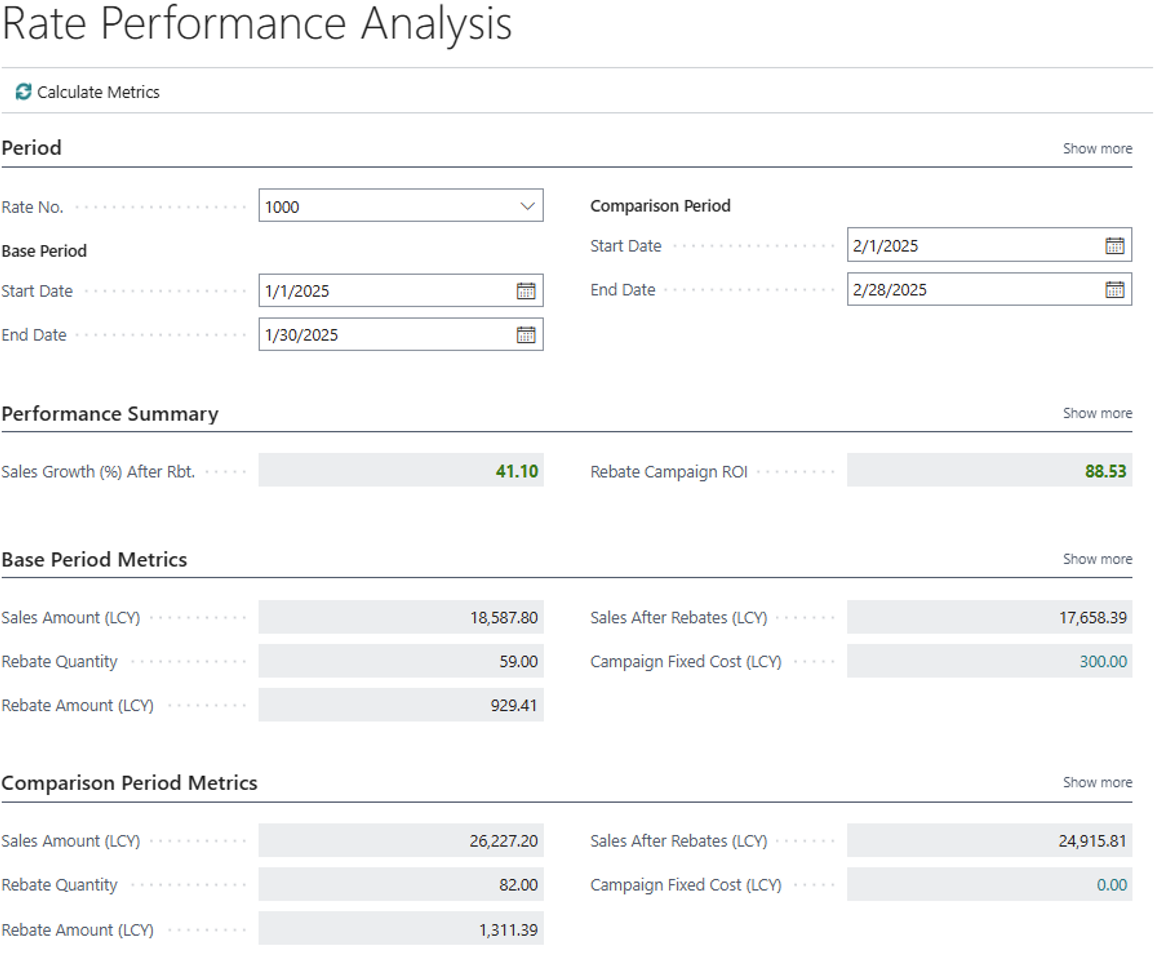
Setup
To perform the analysis, define the filters and periods to compare.
Main parameters
- Rate No.. Rebate rate to be analyzed. Filters the direct rebate entries associated with the selected rate. It must exist in Direct Cust. Rbt. Rate.
- Customer No.. Customer used for the comparison. It is optional. If left empty, all customers associated with the rate and the selected period are included.
- Base Period - Start Date. Start date of the base period. Entries with a posting date equal to or later than this date are included.
- Base Period - End Date. End date of the base period. Entries with a posting date equal to or earlier than this date are included.
- Comparison Period - Start Date. Start date of the comparison period.
- Comparison Period - End Date. End date of the comparison period.
- Calculate Metrics. Runs the calculation and updates all metrics, indicators, and visual styles. It is recommended to complete all four dates before calculating.
The comparison period uses the same rate and customer filters as the base period.
Performance summary
The summary compares the results of both periods and shows the difference in net sales and total campaign cost.
Sales Growth (%) After Rebate
Percentage change in net sales between both periods.
Net sales are calculated as: Net sales = Total sales - Total rebate amount
The percentage is calculated as: ((Net sales in the comparison period - Net sales in the base period) / Net sales in the base period) x 100
The field is shown in favorable, unfavorable, or standard style depending on whether net sales increase, decrease, or remain unchanged. If base-period net sales are zero, the percentage is not calculated.
Rebate Campaign ROI
Indicates how much net sales increase for each additional unit invested in rebates and fixed campaign costs.
Total campaign cost is calculated as: Total cost = Rebates + fixed campaign costs
ROI is calculated as: (Net sales in the comparison period - Net sales in the base period) / (Total cost in the comparison period - Total cost in the base period)
If total campaign cost does not change, ROI is not calculated.
Rebate Campaign ROI Insight
Explanatory text summarizing the combined evolution of net sales and campaign costs. It may show messages such as:
- Net sales increased and costs also increased.
- Net sales increased without changes in costs.
- Net sales increased while costs decreased.
- The campaign is in balance.
- Net sales did not change even though costs changed.
- Net sales decreased while costs increased.
- Net sales decreased without changes in costs.
- Both net sales and costs decreased.
Period metrics
The period metrics show the outcome of the rebate rate during the reference period.
- Sales Amount (LCY) Total sales amount for the period, expressed in local currency.
- Rebate Quantity Total quantity associated with the direct rebate entries in the period.
- Rebate Amount (LCY). Total rebate amount for the period.
- Sales After Rebates (LCY). Net sales for the period after deducting the rebate amount.
- Campaign Fixed Cost (LCY). Fixed campaign costs for the period. Drilling down on this field opens the Rebate Entries page filtered by the rebate type
Cost. - Number of Entries. Number of entries included in the calculation for the period. The drill-down opens Direct Rebate Entries with the applied filters.
Calculate Metrics
Runs the calculation and updates:
- both periods' metrics
- net sales growth
- campaign ROI
- ROI explanation text
- visual indicator styles
It should be executed after changing the rate, customer, or dates.