Initial Synchronization
Once the synchronization of commissions and sales with Dynamics 365 Sales has been activated, an initial synchronization of all the ones existing in Business Central must be performed.
Requirements and recommendations
If no commissions have been generated yet because iDynamics Commissions has just been installed in Business Central, you will first need to configure this app and generate the commissions and sales statistics. We include a link to the documentation on this, and also a link to our support portal in case you need help with it.
Required that all salespeople, customers and currencies (standard synchronization) are already synchronized, otherwise the synchronization of commissions and sales that use them will cause errors.
- It is required that all Dynamics 365 Sales users who correspond to salespeople in Business Central have at least the Commissions Salesperson role, otherwise the synchronization of their commissions will fail, as will the commission forecast for sales opportunities.
Important to do it before the next step of activating automatic synchronization, otherwise many errors could occur due to related tables and the dependent records not having had time to synchronize.
Initial synchronization of commissions & sales
Once the Dynamics 365 Sales Integration Setup page page is shown at the end of the wizard, or if it is opened manually, a notification is displayed indicating that the initial synchronization of commissions and sales must be run, and it can be launched by clicking the action available in that notification.

Another way to launch it is through the action available for this on the Dynamics 365 Sales Integration Setup page page.
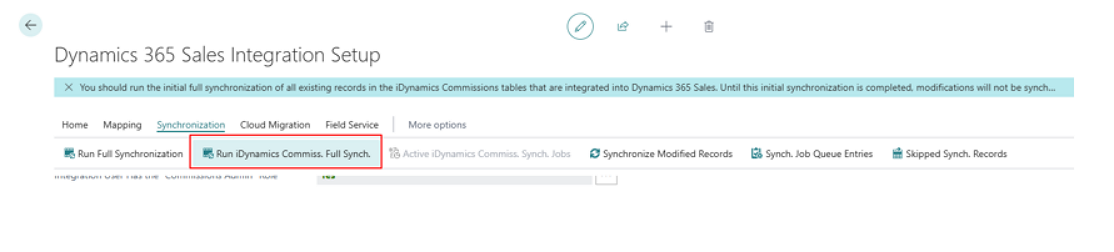
Once the initial synchronization page for commissions and sales is open, the only things to do are:
- Verify that the recommended action is "Full Synchronization" for all entities. This will be the case when installing and configuring the extension for the first time, since it is automatically detected that no records from the commissions and sales tables have been synchronized yet.
- Click the "Sync All" action. This action executed from this page does respect the order, so detailed commission entries will not start synchronizing until all commission entries they depend on have been synchronized, and the same applies to sales statistics and their details.
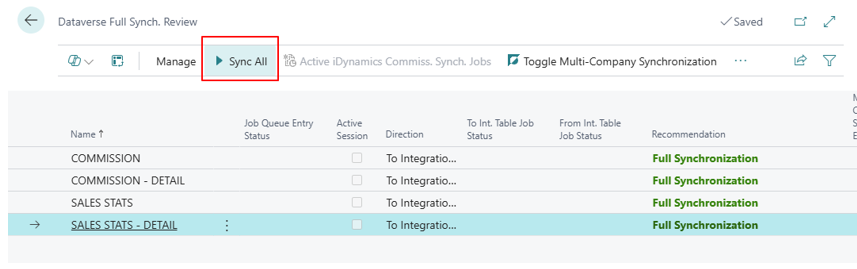
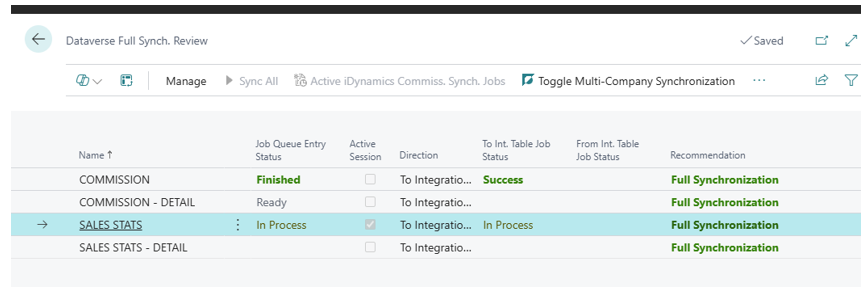
The recommendation is not to close the page until this synchronization finishes. You need to keep refreshing the screen to see the progress. Depending on the number of commission and sales records, it may take more or less time. It is done when all four tables show a "Finished" status.
If you close it for any reason, no problem — you can open it again and check how it is going.