Licensing
How is iDynamics Commissions 365 Sales Connector licensed?
Viewing commissions and sales generated in Business Central from within Dynamics 365 Sales requires two components.
- The iDynamics Commissions 365 Sales solution on Dynamics 365 Sales.
- The iDynamics Commissions 365 Sales Connector extension in Business Central.
License control is handled by the iDynamics Commissions 365 Sales Connector extension in Business Central, which is the one that synchronizes the data so it can be viewed from Dynamics 365 Sales and which provides the web service to enable commission forecasting within Dynamics 365 Sales for the commissions salespeople would earn if their sales opportunities were to materialize.
iDynamics Commissions 365 Sales Connector is offered on a pay-per-use basis to Business Central customers, with a fixed monthly fee that provides access to unlimited users. You can contact our sales team at sales@idynamics.es to inquire about the subscription pricing.
Try the product in an evaluation environment
Regardless of the number of users, if you want to try the full functionality of the product, you can do so by installing both components from AppSource and using them in an evaluation company. The complete functionality of the product will be automatically available, without any extra steps, and with no time limit.
Activate a trial period
You can also install the product from AppSource in your production environment, or a copy of it, and try the product for free for fifteen days (once the product is installed, a message will be displayed with an action to activate the trial period).
If it is necessary to extend this evaluation period, you can request it by contacting our sales team at sales@idynamics.es.
Contact, Pricing and Further Questions
If you or one of your customers is interested in iDynamics Commissions 365 Sales and has any questions or needs more information, you can contact us by sending an email to sales@idynamics.es.
Check Subscription Status
In Business Central, on the Dynamics 365 Sales Integration Setup page page, you will find a Subscription Information section showing the status of your subscription.
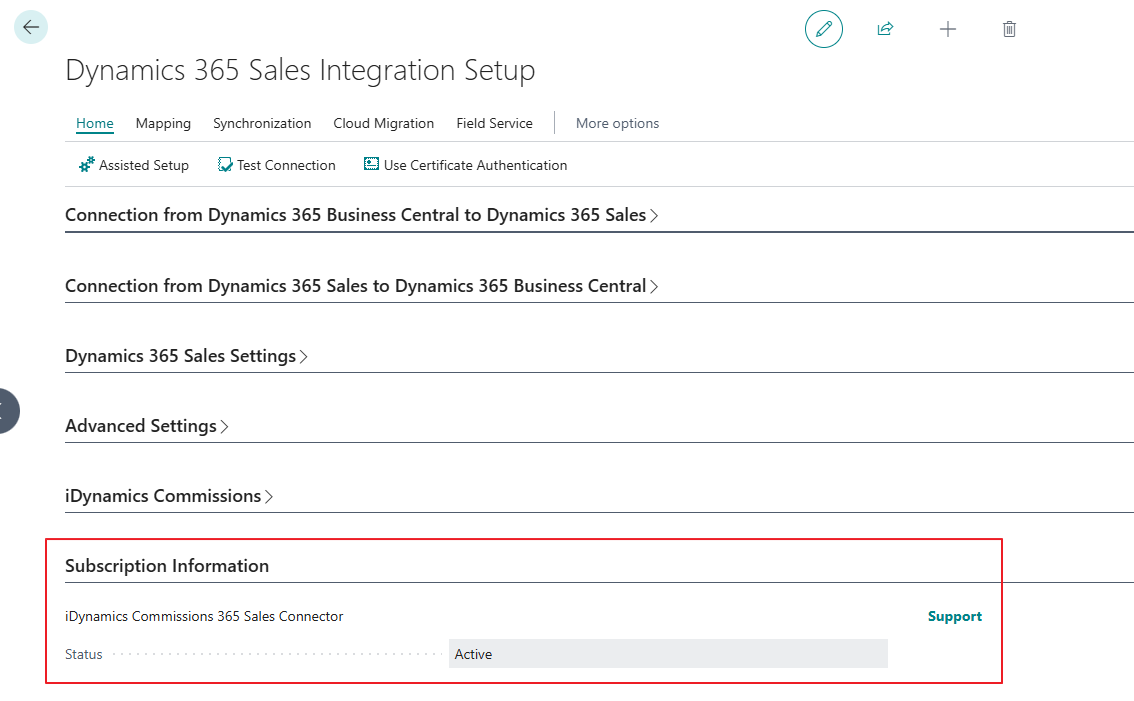
The status can have the following values:
- No Subscription
- Trial
- Trial Expired
- Active
- Expired
In addition to that, you will find links to our support portal and a link with which to activate the trial or full subscription, if no active subscription is found.