Customer Rebate Import Journal
Description
For customers that generate rebates in an external system, the import journal allows those rebates to be brought into Business Central so they can be managed within iDynamics Rebates and included in all standard reporting, settlement, and processing workflows.
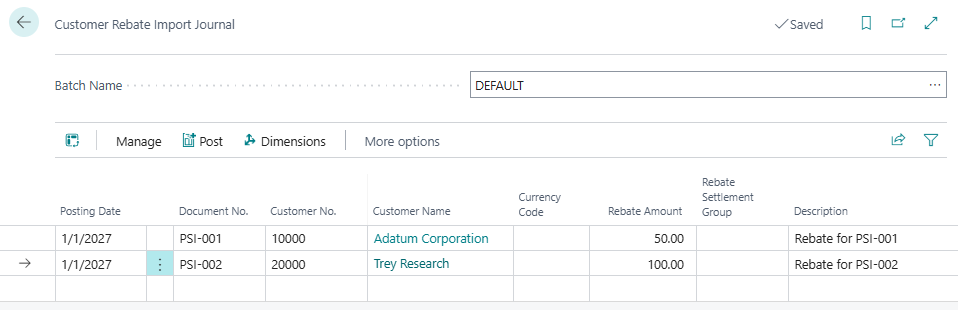
Entering Data in the Journal
Data may be entered:
- Manually, line by line.
- Using Edit in Excel.
- Through RapidStart for bulk loading.
- Through external integrations that write directly to the journal table.
By default, the following fields appear in the journal:
- Posting Date – Specifies the date on which the rebate was generated.
- Document No. – A reference identifying the source of the rebate. The same number may be used for multiple customers but can appear only once per customer.
- Customer No. – The customer receiving the rebate.
- Rebate Amount – The rebate amount assigned to the customer.
- Description – A brief explanation of the rebate or the reason it was entered through the journal. If left blank, the system requests a general description for all empty lines at posting time.
In addition to the required fields, the journal also supports optional data used in reports and analysis:
- Settlement Group Code – The settlement group assigned to the resulting rebate entry.
- Base Amount – The base amount on which the external system calculated the rebate.
- Sales Amount – The sales amount associated with the rebate.
- Dimensions – Analytical dimensions used for reporting, settlements, and grouping.
Posting the Journal
Once all data has been entered, the Post action creates one rebate entry for each line.
If selected during posting, a provision entry can also be created for each rebate.
After posting is complete, the journal is cleared to allow a new import batch to be started.
Campaign Costs
This journal can also be used to record campaign costs, that is, the investment made in a promotion or commercial campaign, directly against a rebate rate. This allows you to measure the actual profitability of the campaign by comparing the sales and rebates it generated with the costs incurred.
To enter a campaign cost, select the corresponding rebate type and specify the rebate rate number for the line. Both values are mandatory for this kind of entry, since they guarantee full traceability between the cost and the rebate rate it belongs to.

Once posted, campaign cost entries behave like standard amount-based rebates and are automatically taken into account by the Rebate Campaign Performance & Sales Impact Analysis.