What's new – iDynamics Shopfloor
Version 26.0
Indicate "Applies-to Entry" to reverse a posted output
Shopfloor now allows selecting the output entry (Applies-to Entry / Liq. por nº orden) when reversing a posted output directly from the manufacturing screen, preventing errors when multiple output entries exist.
See the full explanation and screenshots:
Indicate "Applies-to Entry" to reverse outputs with multiple movements
Calculate Deviation % when creating the Production Order from the Planning Worksheet
The Deviation Percentage feature is now also applied during planning.
When calculating planning, components inherit the deviation percentages defined in the Production BOM.
👉 See the full explanation here:
Component consumption – Deviation calculation in planning
Published: November 20th, 2025
Version 25.2
Deviation percentage to require manual consumptions before posting
A new enhanced validation is added for manual component consumption, based on a
Deviation Percentage defined in the Production BOM.
When Manual Consumption Type = Forced Consumption, the system only allows posting production if all manual-consumption components fall within the permitted range.
👉 Full explanation here:
Component consumption – Deviation %
Published: August 1st, 2025
Version 25.1
Automatic backward consumption in subcontracting
This version introduces an improvement in the subcontracting flow, available when the “Automatic Subcontracting” option is active in Shopfloor Setup.
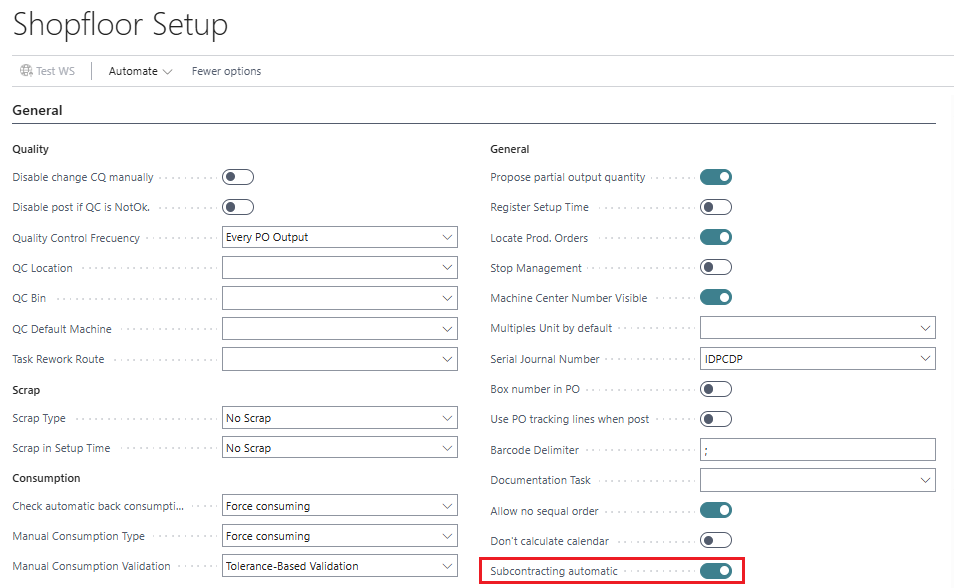
If enabled, when posting the purchase order linked to the subcontracted production order line, components with backward consumption are automatically posted — exactly as if the output were posted in a non-subcontracted manufacturing scenario.
As a result, both output and consumption entries are generated:

This ensures a more reliable and controlled process in subcontracted manufacturing scenarios.
Automatic calculation of components using percentages in the Production BOM
This version introduces a major improvement in the management of Production BOMs, allowing components to be defined using percentages, automatically calculating the required quantity in both the BOM and in Production Orders.
Previously, Business Central only supported fixed quantities.
With this feature, quantities are dynamically recalculated according to the percentage entered, respecting:
- the component’s Unit of Measure (UOM)
- the finished product’s UOM
- rounding precision
- conversion rules
This is especially useful for formulas, mixtures, and products with specific proportions.
New field: % Proportion in the Production BOM
Defines what percentage of the total each component represents.

Automatic recalculation of “Quantity per”
When the percentage changes:
- Quantity is automatically recalculated
- If the component and finished product UOM differ, conversion is applied
- Rounding rules of the item are respected
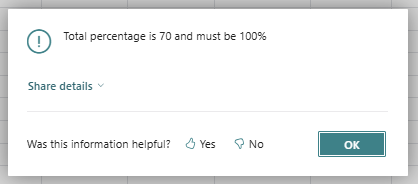
New action: Check percentage
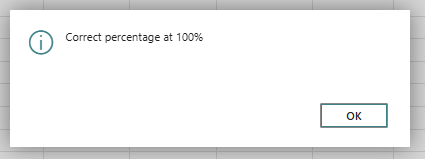
Verifies that the sum of percentages is exactly 100%, showing a warning otherwise.
If correct:
In Production Orders
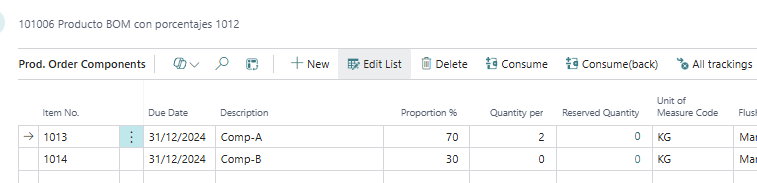
When a Production Order is created or refreshed, the percentages are automatically transferred:
- Applying the percentage
- Converting between units (PCS ↔ KG)
- Applying rounding precision
Component view inside the PO:
Published: July 4th, 2025
Version 25.0
Improved manual consumption calculation based on component UOM
The logic for manual component consumption in Shopfloor is improved so that all calculations use the component’s Unit of Measure.
Previously, calculations were done using base quantity, since BC manages tracking in base units, leading to discrepancies for components with alternate units.
From this version onward, the application:
- Automatically converts base quantities to the component UOM
- Shows Reserved Quantity and To Consume in the UOM indicated on the component line
Example
A component has base UOM KG and an alternate UOM GR:
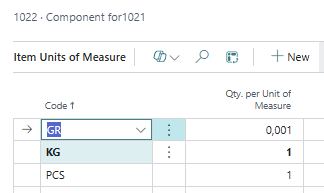
We create a component line in GR:

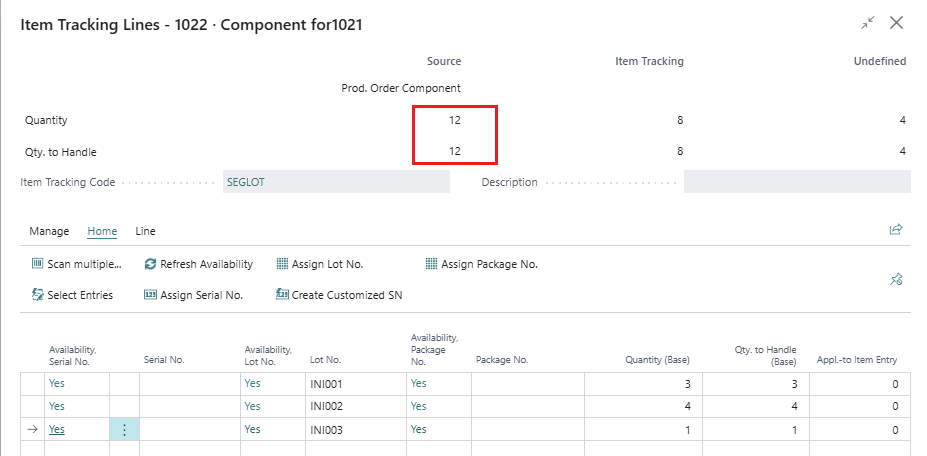
If we open tracking from BC, it appears in base UOM (KG).
In this example: 8 of 12 KG, equal to 8000 GR:
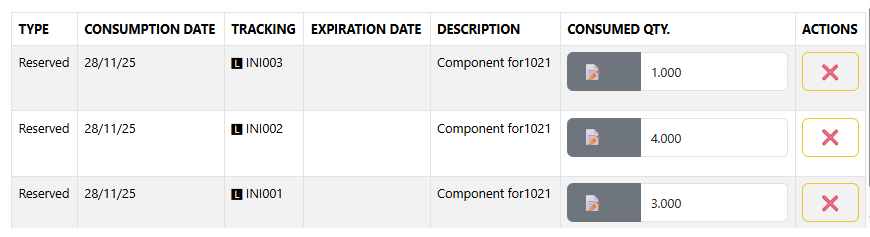
In Shopfloor, we see 8000 GR reserved and the detailed tracking entries in GR:
Published: May 28th, 2025
Version 0.3
- Subcontracting management.
- Operator costs.
Published: November 1st, 2023
Version 0.2
- Configurations: Manufacturing Setup, Manufacturing Products, Bills of Materials, Routings, Work Centers, Machine Centers...
- Stop reasons list.
- Scrap reasons list.
- Toolbox for daily manufacturing operations.
- Visual touchscreen for handling a Production Order: start, stop, setup time, operator control, scrap reasons, documentation...
- Current productive plant status added.
- Manufacturing lot/serial number management.
- Configurable pallet management per machine center.
- Manufacturing parameter checklist.
- Automatic backward consumption methods with lots.
- Production by families.
- Production order report included.
- Ability to sequence machines.
- Query and traceability of movements and consumption by operators.
- Debug mode for scenario testing.
Published: October 1st, 2023